Mac Window Switcher With Previews
Choose individual windows with Cmd+Tab—even when they belong to the same app. Nothing to configure. It just works.
14-day free trial · No card requiredApple Silicon · macOS 15+Paid license required after the trial.
Enable Accessibility to switch windows and Screen Recording to see window previews. Setup guide
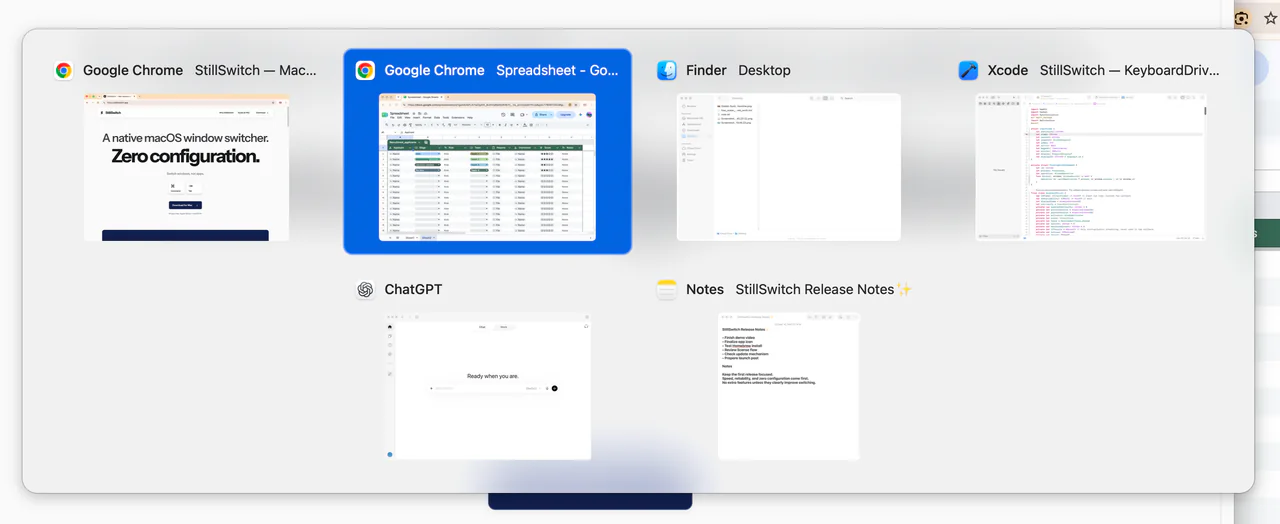
The window is the destination.
A window switcher lets you select a particular open window. StillSwitch puts those choices in the familiar ⌘Tab gesture: hold Command, choose a window, then release Command to switch.
macOS has built-in ways to choose windows too. If you’re looking for the standard shortcuts and Mission Control, start with how to switch between windows on Mac.
Three browser windows. Three choices.
A research window, a working document, and a separate project shouldn’t all look like one destination. StillSwitch gives each eligible browser window its own entry, just as it does for windows from other apps.
These are separate windows, not individual browser tabs. Each entry can show a window preview; if a preview isn’t available, an app icon keeps the window selectable. Minimized windows use icons.
Recency belongs to each window.
Window-level MRU means “most recently used” at the window level. The order follows the windows you’ve used, including separate windows belonging to the same app.
Your previous window can be another browser window or a document in a different app. Both belong in the same recent-window history. Read how StillSwitch works.
Zero configuration. No switching animation.
StillSwitch fixes the switching behavior in advance, without adding a transition animation. For the practical tradeoff between fewer choices and flexibility, see a simple window switcher for Mac.
Zero configuration doesn’t remove macOS’s permission requirements: Accessibility enables switching, and we recommend enabling Screen Recording to see window previews. Without it, windows remain selectable using app icons. Trial and license controls live in the menu bar. See the first-use steps.
Your window data stays on your Mac.
Window titles, previews, and switching history are processed locally. The Mac app has no analytics, session recording, or cloud account.
License operations and update checks use the network. Website analytics are separate from the app. Read the app privacy details.
Native on Apple Silicon.
StillSwitch is made for Apple Silicon Macs running macOS 15 or later. Intel Macs aren’t supported. Its focused design keeps the job simple: choose a window and get back to it.
Try it free for 14 days. No card. No subscription. A one-time license covers StillSwitch 1.x on up to three Macs.